
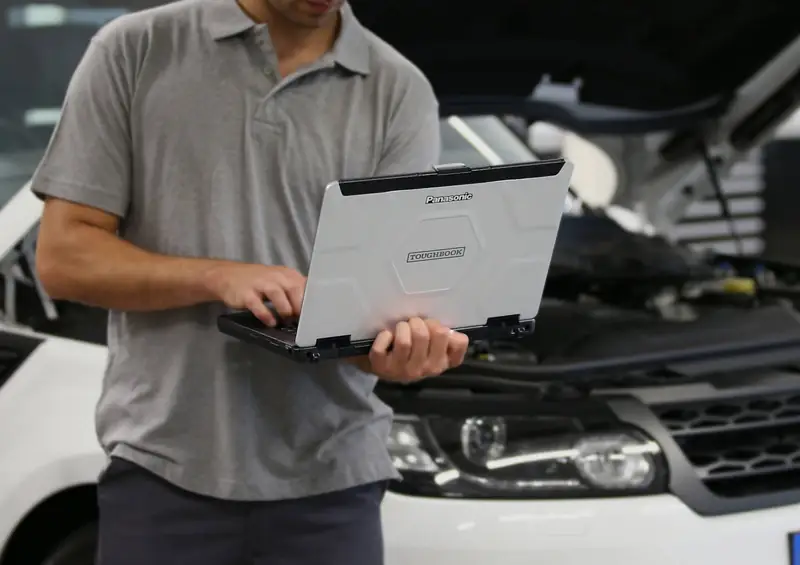
A shop laptop has one main job: run the carmaker's diagnostic and programming software through a vehicle interface (VCI) without dropping the connection halfway through a module flash. It also has to survive grease, coolant, a slide off a fender and a long day away from the bench outlet. Here's what automotive technicians should look for, and the rugged models shops and fleets choose. See sources.
What the laptop does in the bay
- Diagnostics. Reading codes, live data and datalogs through the OEM's software and a VCI, such as GM's MDI 2 or Toyota's Mongoose-Plus.
- Module programming. Flashing and setting up control modules, often with large calibration files downloaded from the OEM.
- Service information. Wiring diagrams, repair procedures and technical bulletins, side by side with live data.
- The paperwork. Repair orders, parts lookup, photos and estimates.
Check the software's requirements first
Each OEM sets its own PC requirements, so start with the software you'll run. Two examples:
- Toyota Techstream Lite lists Windows 11, an Intel Core i5 or Ryzen 5, 8 GB of RAM and 256 GB of free disk space at minimum. Its VCIs connect by USB.
- GM Techline Connect: GM's dealer guidelines recommend Windows 10 or 11 Pro, local administrator rights for installing software and updates, and a drive of 1 TB or larger for programming, because calibration files are big.
Those are minimums. Getac suggests 16 to 32 GB of RAM and an NVMe SSD for current diagnostic, programming and ADAS work, and we'd choose at least 16 GB if the laptop also runs service information and a browser full of bulletins. Every model below runs 64-bit Windows; see our RAM upgrade guide and SSD upgrade guide if you're updating a laptop you already own.
What matters in a shop laptop
- A wired connection to the VCI. Wi-Fi is convenient for scanning, but a dropped link mid-flash is the risk you can't afford. Since June 2025, GM requires a hard-wired USB or Ethernet connection to the MDI 2 for every programming event, and says Ethernet gives the best overall performance. Look for a built-in Gigabit Ethernet port and at least two USB-A ports.
- Ethernet for newer vehicles. Getac recommends 10/100/1000 Ethernet as vehicles adopt Gigabit Ethernet for their onboard networks. The TOUGHBOOK 56 can take up to three Ethernet ports.
- A battery that won't quit mid-flash. Toyota warns that once reprogramming starts it must not be interrupted, and the PC must not go into standby or hibernation. Getac recommends dual batteries to avoid a crash during re-flashing. A hot-swappable second battery lets you change one without shutting down. Keep the vehicle on a battery maintainer too: GM's guidelines call for one maintainer for every two MDI tools in use.
- Screen size. Getac recommends a screen of 10 inches or more, 11 inches for the best experience, and a larger screen for datalogging and wiring diagrams. A 14" or 15.6" laptop fits most bays; a sunlight-readable screen helps on road tests and in the lot.
- A true serial port if you still work on older equipment or heavy trucks with RS-232 tools. See rugged laptops with a serial port.
- Spills, drops and greasy hands. Rugged models are drop-tested to MIL-STD-810, and many have spill-resistant keyboards. See ratings explained.
Laptops shops and fleets choose
| Model | Best for | Why |
|---|---|---|
| Toughbook 55 14" semi-rugged laptop, from $899 | Most shops | Up to 64 GB of RAM, built-in Ethernet, optional hot-swap second battery, and an xPAK that adds VGA and true serial. IP53, 3-foot drop. |
| TOUGHBOOK 56 14" semi-rugged laptop, from $3319 | Dealers, newer vehicles | Up to three Ethernet ports at up to 10 Gbps, 12 hours of battery or 24 with the second battery, optional true serial. 16:10 screen. |
| Toughbook CF-54 14" semi-rugged laptop, from $599 | Tight budgets | A low-cost refurbished choice with Gigabit Ethernet, a media bay for a second battery, and optional true serial. Up to 32 GB of RAM on the mk3. |
| Toughbook CF-31 13.1" fully rugged laptop, from $399 | Heavy truck, equipment | IP65 sealed, with true serial, VGA and Ethernet built in, and a 1,200-nit touchscreen. Best for older software; check your OEM's Windows requirement. |
| Dell Latitude 5420/5430 Rugged 14" rugged laptop, from $749 | Fleet maintenance | RS-232 serial and Gigabit Ethernet built in, an optional second battery (both hot-swappable), up to 64 GB of RAM. |
| Getac S510 15.6" semi-rugged laptop, from $2709 | Big screen for diagrams | A 15.6" 1,000-nit screen, Intel Core Ultra, Ethernet and serial, optional second battery. IP53, 3-foot drop. |
| Toughbook 33 12" fully rugged 2-in-1, from $599 | Road tests, under-hood work | Detaches to a tablet for the cabin or a road test, with twin hot-swap batteries and a 1,200-nit screen. Toyota's Techstream ADVi kit is built on the CF-33. |
Prices are for Grade A refurbished units where we carry them. More picks are on our automotive diagnostic laptops page.
Laptop, 2-in-1 or tablet?
- A laptop (Toughbook 55, TOUGHBOOK 56, Getac S510) suits technicians who work from a cart or bench and want the most ports, a full keyboard and a bigger screen for wiring diagrams.
- A 2-in-1 (Toughbook 33) suits technicians who take the computer into the cabin or onto a road test, then dock it at the bench.
If the laptop stays in the bay, a semi-rugged model is usually enough. Choose fully rugged for mobile service trucks, heavy equipment and work outside. See fully rugged vs. semi-rugged.
Stretch the budget
GM's guidelines suggest a laptop for each technician who programs and diagnoses, or one for every two otherwise, so a shop can need several. Many shops buy Grade A refurbished units, set up with a genuine copy of Windows and the memory and storage their software needs. See buying a refurbished Toughbook, or request a quick quote for your shop.
Sources
- GM TechLink: SPS events soon to require hard-wired connection to MDI 2 (June 2025; USB or Ethernet required for programming from June 23, 2025, Ethernet for best performance)
- GM TechLink: New 2024 Dealer Infrastructure & Security Guidelines (November 2024; Windows 10 or 11 Pro, administrator access, 1 TB or larger drive, one laptop per technician, one battery maintainer per two MDI tools)
- Toyota: Techstream Lite FAQ (April 2026; Windows 11, Intel i5 or Ryzen 5, 8 GB RAM, 256 GB free, USB VCIs)
- Toyota: TIS Techstream ADVi (built on the Panasonic CF-33; reprogramming must not be interrupted and the PC must not sleep)
- Getac: Laptop for automotive diagnostics (screen of 10 inches or more, 11 for the best experience; dual batteries for re-flashing; Gigabit Ethernet)
- Getac: The best Windows laptop for automotive diagnostics, programming and ADAS (October 2026; 16 to 32 GB RAM, NVMe SSD, hot-swappable batteries)
- Model specifications: Panasonic, Getac and Dell, as listed on our model pages.